
Built for Control. Designed for Security.
The technical view of SecureGuard for engineers and security reviewers: how configuration, segmentation, authentication, logging and deployment work.
What ships today.
| Area | Feature | Status |
|---|---|---|
| Security | SecureAssess: connect to Secure Assess as its inside scan agent, with automatic scans of your public addresses and block-rule proposals you approve | Shipping (1.1.214+) |
How every change is applied.
- EditChange policy
- ValidateCatch mistakes
- ValidateChecked before it applies
- CommitApply atomically
- RevisionUndo any time
Select a step to see what happens.
For IT and security professionals.
Architecture
Built on proven open components, with one validated configuration behind every change.
Configuration management
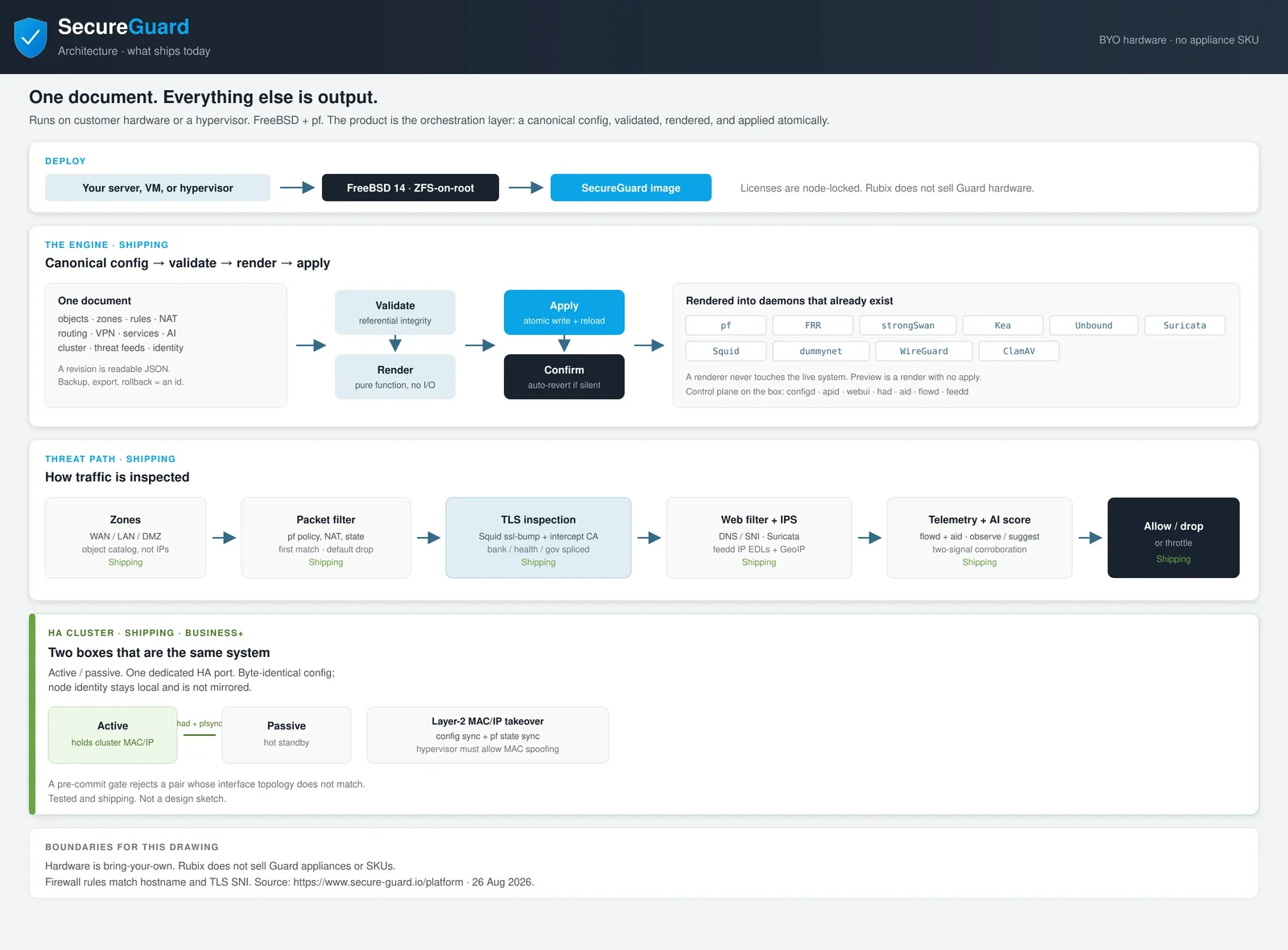
Every change runs validate → render → apply, atomically. Validation is referential and reports every problem; a document that doesn't validate is never rendered or applied. Renderers are pure functions with no I/O, so a preview is a render with no apply.
Each state is an immutable revision addressed by the SHA-256 of its canonical JSON, with a parent pointer, author and message. Backup, restore, export, rollback and HA config sync are all operations on revisions.
Network segmentation
Policy is written zone-to-zone and references named objects (hosts, networks, ranges, groups, services) — never raw addresses. Moving an interface between zones never rewrites a rule. A built-in zone represents the firewall itself. NAT is kept separate from filter policy. Application matching uses DNS NXDOMAIN and TLS SNI (and Squid when TLS inspection is on) — hostname/SNI matching, not full protocol decode.
Authentication & access
The management API provides admin authentication, role-based access control and an audit log. Local admin login is available on every tier; external authentication (RADIUS, LDAP, Active Directory, SSO) is a Business+ feature. Secrets such as API credentials are stored in a secret store and referenced by name, never inlined in the configuration document.
Logging & visibility
Each daemon logs through one local collector with a bounded in-memory ring buffer per service and rotating files on disk; remote syslog targets are configurable. Firewall logging is per rule, and rendered rules carry the rule's own label, so a live pf view can be filtered to a single console row. Flow telemetry combines pf state, pflog and Suricata EVE events; traffic reports run over the same data. Rendered configs, the audit log, a terminal and a support bundle are available in the console.
Deployment options
Install on x86-64 hardware or a VM you control: two NICs minimum (a third for a dedicated HA link), 4 GB RAM minimum, and a whole disk (the image is 6 GB). Upgrades install a signed system image into a new ZFS boot environment; a health check on first boot keeps it or rolls back to the previous environment. Rubix doesn't sell SecureGuard hardware.
Supported security controls
- Stateful pf firewall, NAT, objects and zones (all tiers)
- Suricata IPS; Web Filter, Safe Search and DoH block (all tiers)
- SYN proxy, per-source rate limits, scan/sweep detection with allow/alert/block/block-ip actions (all tiers)
- TLS inspection (Squid ssl-bump, on-box CA, :443 redirect, QUIC drop, zone scope, banking/health/government splice) (all tiers)
- Threat feeds into pf tables, GeoIP when you supply a MaxMind key (all tiers)
- AI observe/suggest (all tiers); opt-in auto-mitigation with two-signal corroboration (Business+)
- Active/passive HA with config and pf state sync (Business+)
- On-box Ed25519 license verification, node-bound, failing safe to Community
Known limitations
- Application matching is hostname/SNI based, not full protocol decode.
- Off-box deep AI models and the persistent baseline/feedback store are not claimed as shipping.
- HA-aware rolling upgrades are designed but not confirmed end to end.
- No plugin ecosystem; closed-source product.
Want to dig deeper?
The documentation describes mechanisms, not marketing.