
Take Control of Your Network Security.
Protect your business with powerful firewall security, smarter threat detection, and easier network management—all on hardware you control.
Network Security Shouldn't Be This Complicated.
Managing your network shouldn't mean juggling disconnected tools, confusing configurations, and constant uncertainty. SecureGuard brings the controls you need together in one place.
Too Many Tools
Stop jumping between systems to manage your network security.
Complicated Changes
Make updates with more confidence and less guesswork.
Limited Visibility
Get a clearer picture of what's happening across your network.
Meet the Smarter Way to Secure Your Network.
SecureGuard combines powerful firewall protection, intelligent threat management, and simplified administration into one platform.
Your network at a glance
Start from the dashboard, then drill into health, performance and network health under Overview — with a live log one click from any service.
- Per-service live logs, filterable to a single rule
- Health, performance and network-health views
- Audit log of who changed what
See suspicious activity sooner
AI Insights, threat feeds and DoS protection live together under Security, with Flow Monitor under Overview.
- Suricata IPS and flood/recon protection
- AI insights that explain themselves
- Exclusions so your own scanners aren't flagged
Policies that read like your network
Write rules between zones using named objects — LAN to WAN, not port numbers and raw IPs. NAT has its own screen so it never gets tangled with policy.
- Objects and zones, never hand-typed addresses
- Preview every change before it applies
- Roll back to any revision
Every connection in one place
IPsec, WireGuard, SiteLink, client VPN and more are managed in the same configuration as the rules that protect them.
- Site-to-site and remote-access VPN
- Previewed and reversible like any change
- Limits set by your plan
Everything an admin needs
Authentication, certificates, alerting, HA, backups, upgrades and licensing — without dropping to a shell.
- Backup/restore and upgrades that can back out
- HA cluster management (Business+)
- Built-in terminal and support bundle
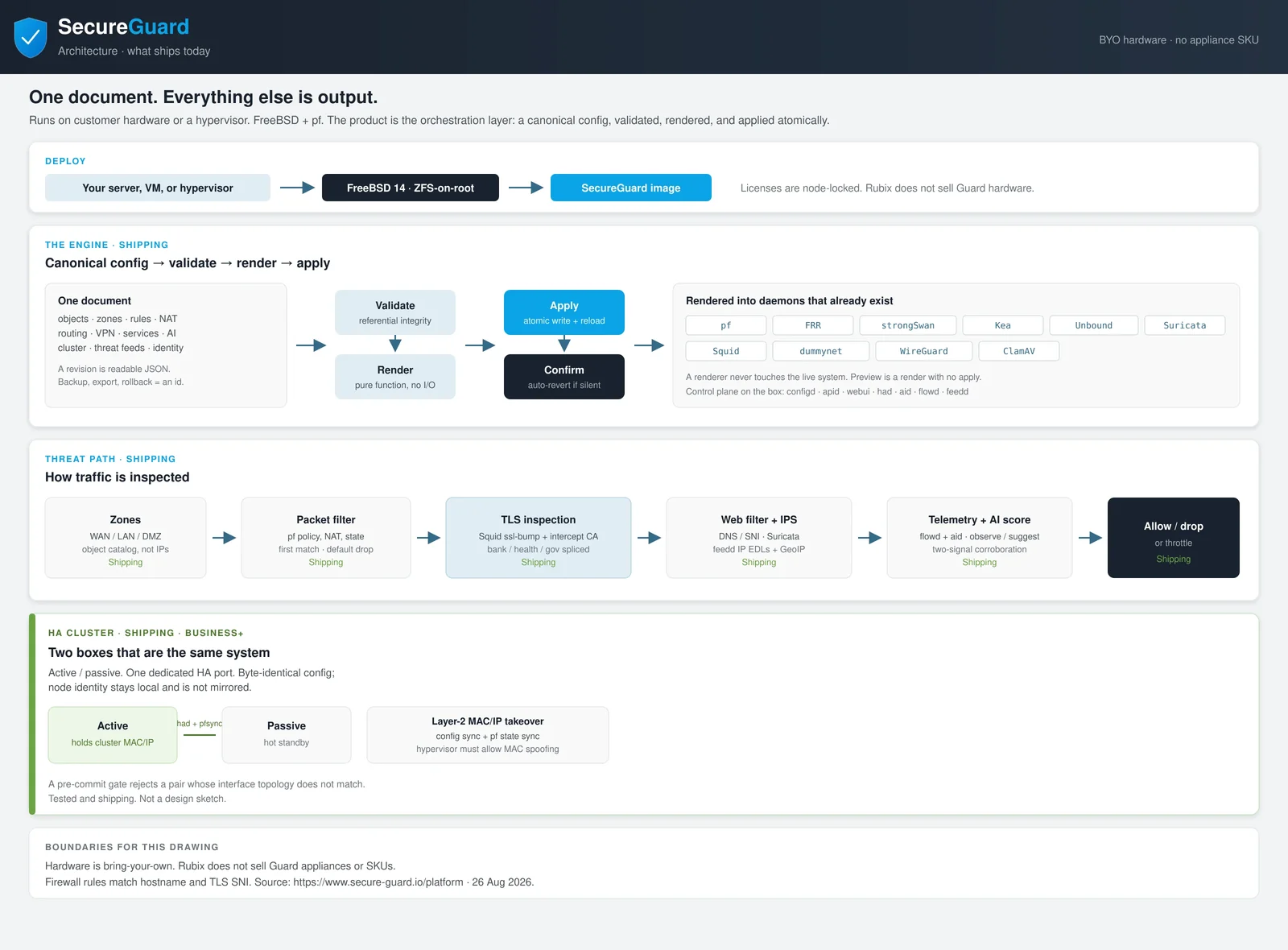
The real SecureGuard architecture: one configuration, validated and applied to every part of the firewall.
Everything You Need to Stay in Control.
Firewall Management
Create, organize, and manage network policies without unnecessary complexity.
Learn moreAI-Assisted Threat Protection
Identify suspicious activity and respond with greater visibility and control.
Learn moreVPN & Secure Connectivity
Keep your offices, teams, and systems securely connected.
Learn moreConfiguration Rollback
Preview changes, apply updates, and return to previous configurations when needed.
Learn moreCentralized Management
Manage important network security settings from one convenient place.
Learn moreHigh Availability
Build greater resilience into your network security infrastructure.
Learn morePowerful Protection. A Simpler Process.
Deploy
Install SecureGuard on supported hardware or a virtual environment.
Configure
Set up your network, security policies, and protection settings.
Protect
Monitor activity, manage threats, and maintain control from one platform.
Your Network. Your Hardware. Your Rules.
SecureGuard is software you install, not a box you're locked into. Choose the hardware, keep ownership, and stay in charge of your infrastructure.
- Firewall, NAT & routing
- IPS & web filtering
- VPN & HA (by tier)
- License checked on the box
Hardware flexibility
Run on x86-64 servers or VMs that meet the requirements.
Infrastructure control
Your license is verified on the firewall, so it keeps running if it can't reach us.
Deployment choices
Physical, virtual, or reused firewall hardware after a fit-check.
Less lock-in
No proprietary appliance to buy — and no appliance SKU from us.
SecureGuard doesn't run on every device. Check the hardware requirements before you start.
Smarter Protection That Helps You Stay Ahead.
SecureGuard helps identify suspicious network activity and gives administrators the tools to respond with confidence.
- Threat visibility — IPS alerts, flows and AI insights in one console
- AI-assisted analysis — every finding explains what drove it
- Graduated response — log, slow down, propose, or (opt-in) block
- You stay in control — by default, a person approves every change
- Event monitoring — live logs per service and per rule
AI improves visibility and response — it can't guarantee every attack is stopped. Deterministic protections (IPS, flood and scan protection) always stay on.
Logged and shown in the console. Nothing about the running configuration changes.
Illustration of the documented response tiers and default thresholds. A single signal — however strong — can't trigger an automatic block. By default the AI layer only observes and suggests.
Built for the Networks Businesses Depend On.
Small Businesses
Big protection with straightforward management.
ExploreIT Departments
More control over policy, changes and troubleshooting.
ExploreManaged Service Providers
Consistent, reversible administration across clients.
ExploreHealthcare
Segmented, access-controlled, security-minded networks.
ExploreMulti-Location Businesses
Every site connected with consistent policy.
ExploreNot sure?
See every solution and find your fit.
All solutionsEnterprise-Level Capabilities. Flexible Options.
Start with the free Community edition — the same software as every paid tier. Upgrade when you need more scale or features.
Community
The complete firewall at small scale — not a trial.
Home
Wider scale for a single site, branch or small office.
Business
The production feature set: identity, dynamic routing and HA.
Enterprise
Unlimited scale and every gated feature enabled.
Questions, Answered.
What is SecureGuard?
SecureGuard is a next-generation firewall and unified threat management (UTM) appliance from Rubix Technology. It brings firewall policy, NAT, routing, VPN, intrusion prevention, web filtering and AI-assisted threat analysis together in one configuration you manage from a web console.
What hardware can SecureGuard run on?
64-bit (x86-64) hardware or a virtual machine you control, with at least two network interfaces, 4 GB of memory and a disk you're willing to erase. Rubix doesn't sell SecureGuard appliances. Existing firewall hardware can sometimes be reused after a fit-check and full wipe — there's no certified model list.
Is there a free version?
Yes. Community is free and perpetual — the same image as the paid tiers, never throttled, and a complete firewall at small scale (1 site-to-site tunnel, 10 VPN users). It's not a trial.
How difficult is installation?
You write the SecureGuard image to a disk, boot it, and finish network setup from the console. The appliance then shows a node ID, which you exchange together with your activation code for a license key. See the install guide.
Can I migrate from another firewall?
Coming from Sophos Firewall (XGS / SFOS)? A free Windows app converts a backup into SecureGuard's configuration format so you can simulate and import it. From Sophos UTM 9 and other firewalls, plan to rebuild your rules — there's no automatic importer. Migration guides.
Does SecureGuard support VPN connections?
Yes — site-to-site IPsec (including VTI), WireGuard and SiteLink, plus remote-access client VPN. Tunnel and VPN-user limits depend on your plan.
What happens if I need to undo a configuration change?
Every committed configuration is saved as a revision. Rolling back means re-applying an earlier one — on every plan, including Community. You can also arm a confirm window so a change that locks you out reverts itself.
What is included in paid plans?
Home adds more tunnels and VPN users plus priority updates and threat feeds. Business adds external authentication, OSPF/BGP, active/passive high availability and opt-in AI auto-mitigation. Enterprise unlocks unlimited scale and every gated feature.
More in the full FAQ.
Ready to Simplify Your Network Security?
Discover a more flexible way to protect your network, manage security, and stay in control.